If you print ABS or nylon, you know temperature swings can wreck a part, so an enclosure isn’t optional—it’s essential. You’ll want a box that holds heat, controls humidity, vents fumes, and still gives easy access to your printer. I’ll show four solid options that fit common machines and explain what features actually matter, so you can stop chasing warps and start making strong, reliable prints—but first, let’s match your needs to the right enclosure.
3D Printer Enclosure with LED Light for Ender3/Ender5/CR-10/Neptune/Creality Models
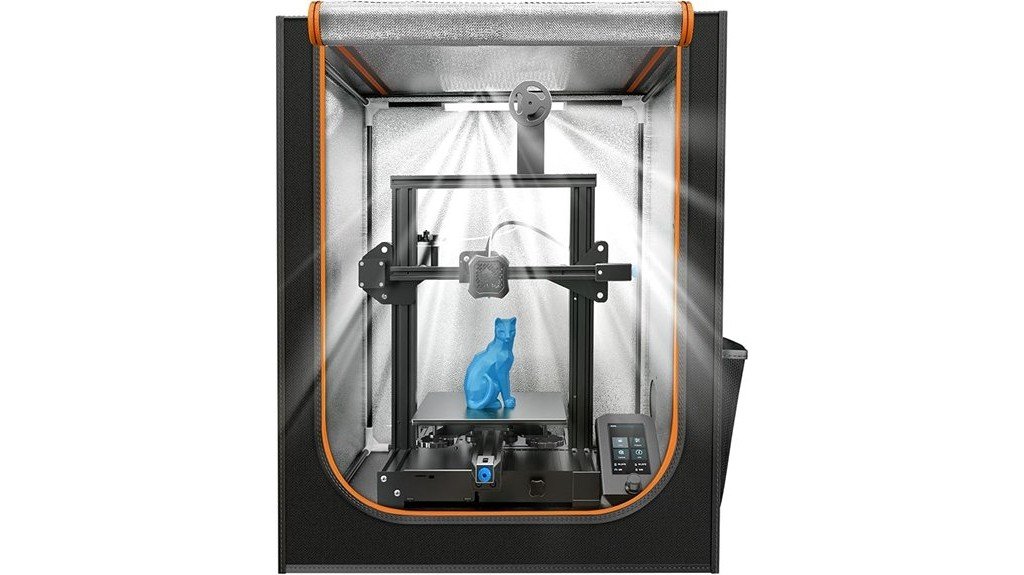
If you print with an Ender or CR-10–series machine and you want simpler temperature control plus built-in lighting, this 3D Printer Enclosure with LED Light is a strong choice: it’s sized to fit popular models like the Ender 3/5 and CR‑10, keeps the interior at a steady temperature to cut warping on ABS and nylon, and has an LED strip so you can watch prints without opening the box. You’ll find quick, five-minute assembly, dustproof and fireproof panels, and noise isolation for a quieter shop. Reviews praise improved print quality, though cable grommets can be snug and the viewing window may crease.
Best For: Hobbyists and small-shop makers using Ender or CR‑10 series printers who want easier temperature control, built-in lighting, and quieter, cleaner printing conditions.
Pros:
- Fits popular models (Ender3/Ender5/CR‑10/Neptune) and provides a stable, warm environment that reduces warping for ABS/nylon.
- Built-in LED strip improves visibility for monitoring prints without opening the enclosure.
- Quick ~5-minute assembly, dustproof/fireproof panels, and noise isolation for a tidier, safer workspace.
Cons:
- Cable routing grommets can be tight and awkward to use for some setups.
- Clear viewing window may have creases or folds that reduce visibility.
- Not suitable for printers larger than 29.5 x 25.6 x 21.6 inches; limited interior space for very large add-ons.
3D Printer Cabinet Enclosure with Ventilation, Thermo-Hygrometer, and LED Light (Fits Printers up to 23W x 22.4D x 25.4H)
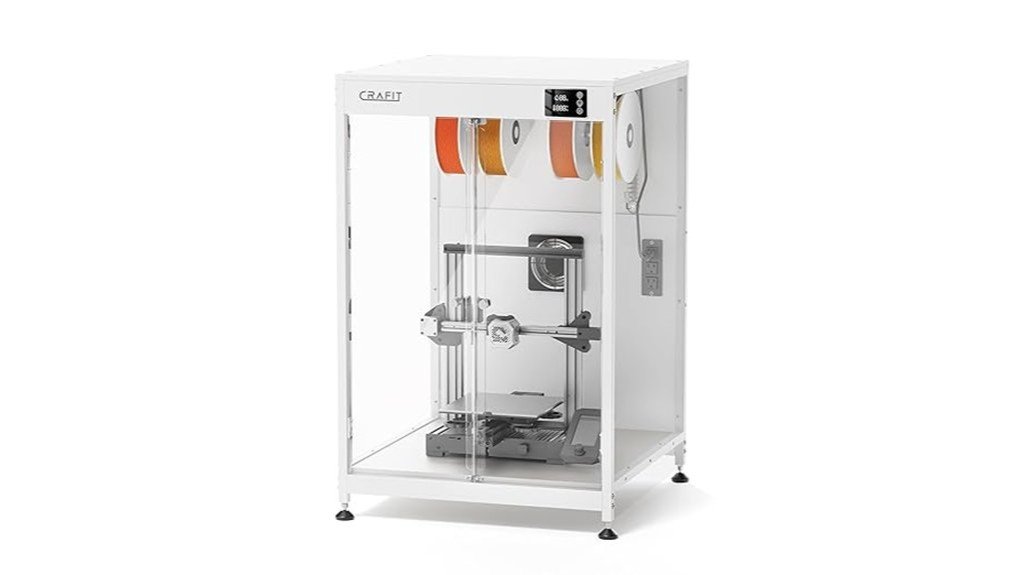
This cabinet is a great choice for hobbyists and small-shop makers who need a controlled printing space for ABS and nylon, because it combines temperature and humidity monitoring with simple ventilation so you can keep prints from warping while clearing fumes when the job’s done. You get a thermo-hygrometer, manual exhaust fan, and bright LED light in a heavy-duty carbon steel frame with PET panels. It fits printers up to 23″ x 22.4″ x 25.4″, cuts noise about 40%, and stabilizes conditions for fewer failed prints. Assembly is straightforward, though check for packaging or minor fit issues. Value depends on your budget.
Best For: Hobbyists and small-shop makers who need a controlled, quieter printing environment for temperature- and moisture-sensitive filaments like ABS and nylon.
Pros:
- Stabilizes temperature and humidity to reduce warping and failed prints.
- Built-in thermo-hygrometer, manual exhaust fan, and LED light add convenience and control.
- Sturdy carbon steel frame with PET panels reduces noise (~40%) and provides good visibility.
Cons:
- Some quality-control and packaging issues reported (bent parts, protective film difficulty).
- Back panel and window materials feel budget-oriented (pressboard/thin acrylic) for the price.
- Manual ventilation requires user intervention; not a fully automated environmental control system.
VEVOR 3D Printer Enclosure (Transparent Acrylic, Ventilated, LED)
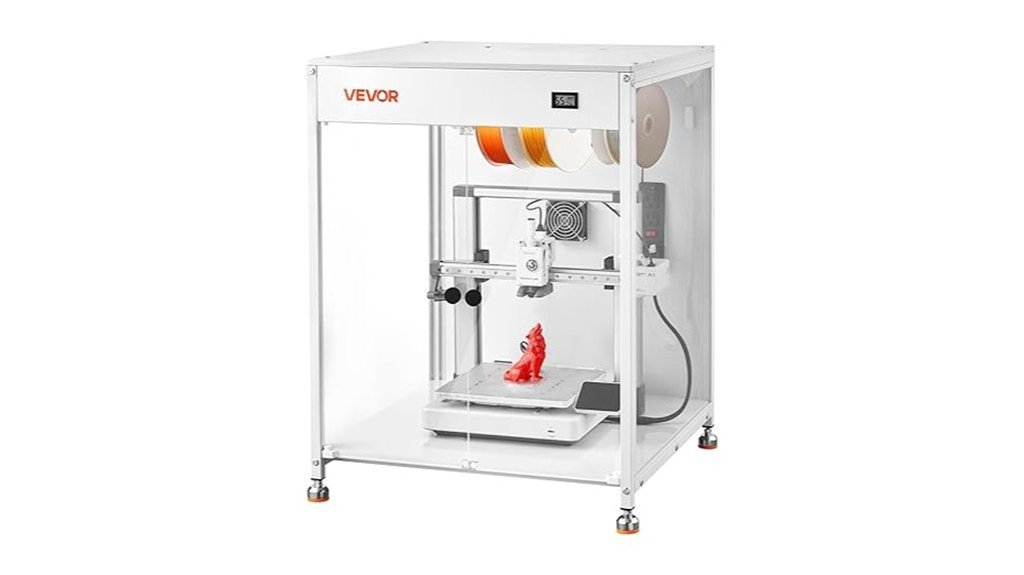
For makers who want cleaner, more reliable ABS and nylon prints, the VEVOR 3D Printer Enclosure is a great pick because it keeps temperatures steady and cuts down on warping and clogging. You’ll fit printers like Bambu Lab A1, Ender3 V3, and Neptune 4 Pro inside its 23.6 x 23.6 x 31.5-inch frame, then watch prints through three clear acrylic panels. It includes LED lighting, a ventilation system to remove smoke and dust, and simple hardware with clear instructions. Users praise its stability and access, though the fan runs about 52 dB, which can be loud in small rooms.
Best For: Makers and small workshop users who print ABS or nylon and need a stable, temperature-controlled enclosure for reduced warping and improved print reliability.
Pros:
- Improves adhesion and reduces warping/clogging by maintaining a constant internal temperature.
- Clear acrylic panels and built-in LED lighting make it easy to monitor prints.
- Ventilation system and enclosed design protect against dust and harmful fumes while providing good access and stability.
Cons:
- Fan noise around 52 dB can be disruptive in smaller or quiet spaces.
- Size limits compatibility to printers that fit within 23.6 x 23.6 x 31.5 inches.
- Acrylic construction may be less durable than metal enclosures and can scratch or yellow over time.
Creality Ender 3D Printer Enclosure Protective Cover (Fireproof, Dustproof, Constant Temperature)
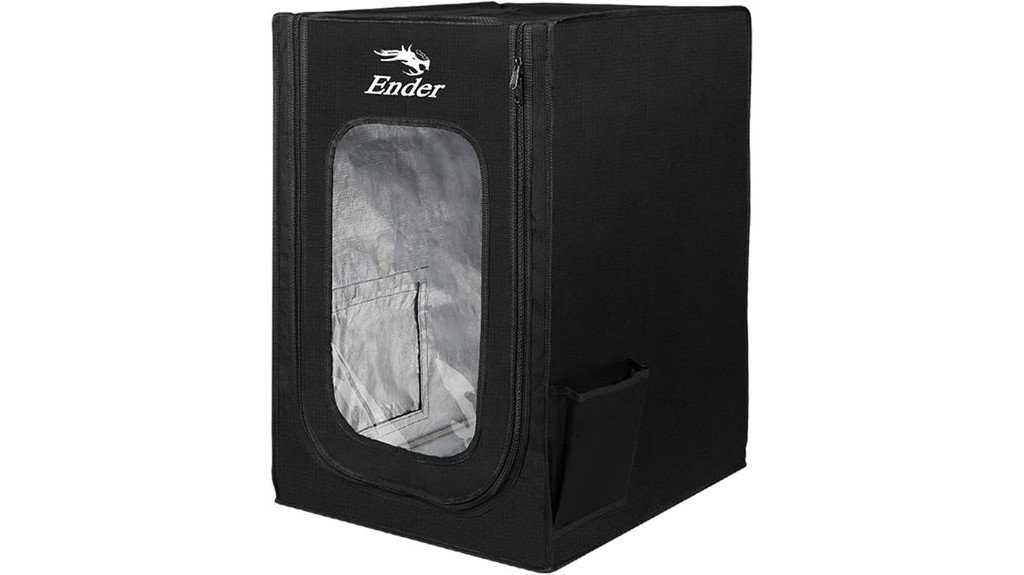
Hobbyists and small workshop owners who print with ABS or nylon will love the Creality Ender 3D Printer Enclosure because it holds a steady warm temperature that cuts warping and gives you cleaner, more reliable prints. You’ll fit it to Ender and similar models easily; the 480 x 600 x 720 mm size covers many popular beds. It’s fireproof, dustproof, and built from flame-retardant materials with aluminum film and glass fiber supports, so you can run long jobs with less worry. Assembly is quick, panels let you watch prints, and users praise the quieter, neater workspace it creates.
Best For: Hobbyists and small workshop owners using Ender-series or similar 3D printers who print ABS/nylon and want improved print quality, reduced warping, and safer long print runs.
Pros:
- Holds a steady warm temperature to reduce warping and improve bed adhesion for high-temperature filaments.
- Fireproof and dustproof construction with flame-retardant materials and aluminum film for safer, cleaner printing.
- Quick, intuitive assembly with clear panels for monitoring, plus reduced noise and odors.
Cons:
- Size (480 x 600 x 720 mm) may not fit larger or non-compatible printer models.
- Lacks built-in internal lighting (some users requested this for better visibility).
- Adds bulk and may limit access during prints despite easy-access doors.
Factors to Consider When Choosing Enclosures for ABS & Nylon Printing
When you pick an enclosure for ABS or nylon printing, you’ll want to think about temperature stability to prevent warping and consistent humidity control to keep filament happy. Make sure the box offers good ventilation and filtration for fumes, is made of materials that won’t warp or off-gas, and gives you enough size and clearance for your printer and parts. These factors work together to keep prints strong and reliable, so weigh each one before you buy.
Temperature Stability
Think of your enclosure as a tiny climate chamber for your prints: keeping the temperature steady inside can make a huge difference when you’re working with ABS or Nylon. You want to avoid sudden swings that cause warping, cracking, or layer separation, so pick an enclosure that holds heat evenly. Insulation helps maintain a warm, stable zone around the part, improving bed adhesion and reducing failed prints from thermal expansion and contraction. When the internal temperature stays consistent, you’ll see smoother surfaces, better dimensional accuracy, and fewer weak spots between layers. For tougher, high-temp filaments, a well-designed enclosure can really boost performance. Think practical: aim for even heat distribution, reliable construction, and materials that trap warmth without trapping surprises.
Humidity Control
Now that you’ve got temperature sorted, you also need to manage moisture inside the enclosure because humidity can wreck your ABS and especially your Nylon prints. Nylon soaks up water, which makes prints weak, bubbly, and prone to failure, so aim for 20%–50% relative humidity. ABS tolerates moisture better, but keeping humidity steady still helps reduce warping and improves layer adhesion. Use an enclosure with a thermo-hygrometer so you can watch humidity and temperature in real time; that simple readout prevents surprises. You might add desiccant packs or a small dehumidifier if levels creep up, and keep filament spools sealed when not in use. These steps are practical, low-effort ways to protect prints and save you time and filament.
Ventilation & Filtration
Because ABS and nylon kick out fumes and tiny particles that you don’t want lingering in your workspace, good ventilation and filtration are as important as temperature control for reliable prints and safe air, and you’ll want to pick an enclosure that makes both easy to manage. You should choose an enclosure with a manual exhaust fan so you can clear smoke and particles after a run and keep the build chamber stable while printing. Look for systems that include replaceable filters to trap VOCs and ultrafine particles, improving air quality. Proper airflow also calms noise—many enclosures cut operational sound by about 40%—and helps control temperature and humidity, which lowers warping risk. Practical, tested filtration keeps you safer and prints more consistent.
Material Compatibility
When you’re picking an enclosure for ABS or nylon, focus on materials and features that keep conditions steady and safe — these filaments hate sudden temperature swings and tiny contaminants. Choose fireproof shells and dustproof seals so sparks, stray fibers, or pet hair won’t ruin prints or start a hazard. Good insulation helps maintain a steady internal temperature, cutting shrinkage and warping for ABS and improving layer adhesion for nylon. You’ll also want built-in ventilation or the option to add filtered airflow to remove fumes safely without chilling the print. Think about durable, non-reactive interior surfaces that won’t off-gas or degrade near hot parts. These choices protect your machine, your prints, and your lungs, making consistent, high-quality results much easier.
Size & Clearance
You’ve already covered how insulation, seals, and ventilation protect ABS and nylon prints; now think about the physical space the enclosure gives your printer. Make sure the internal dimensions fit your machine — most printers need at least 25 inches of clearance height — and leave room around the build plate so larger parts don’t hit walls. Think about total volume: extra space lets you mount a camera, spool holder, or LEDs without crowding airflow. Speaking of airflow, you still need room for vents or filters so fumes don’t build up, yet avoid drafts that cool prints unevenly. Aim to keep internal temperatures steady, roughly 60–80°F. Finally, choose a design that gives easy access for monitoring and maintenance without breaking the enclosure’s thermal integrity.
Safety Features
If you want safer ABS or nylon printing, pick an enclosure that’s built to contain heat, dust, and emergencies without fuss. Choose fireproof, dustproof materials so long prints don’t turn risky, and make sure the structure can handle high temperatures without warping itself. You’ll want consistent internal temperature control to cut warping and improve adhesion, which also reduces failed prints that can spark trouble. Good ventilation is essential — it removes harmful fumes and particles so your workspace stays healthy. Look for strong construction, multi-faceted viewing panels, and easy-access doors so you can monitor and intervene quickly if something goes wrong. These features keep you safer and give you peace of mind during long ABS or nylon jobs.
Noise Isolation
Because loud fans, stepper motors, and cooling systems can make long ABS or nylon prints distracting, choosing an enclosure with good noise isolation matters more than you might think. You’ll find enclosures with thick walls or sound-dampening panels that cut noise by up to 40%, so you can keep printing without annoying roommates or coworkers. Beyond comfort, quieter enclosures help maintain stable temperature and humidity, which boosts print quality for tricky filaments like ABS and Nylon. Many users say their printers suddenly became usable in living spaces once they added an insulated box. When shopping, look for materials that absorb sound and note reported decibel reductions. A quieter setup makes it easier to focus, relax, or work nearby while long prints run.
Ease of Access
Want to get to your print fast without fumbling or stopping the job? Choose an enclosure with easy-access doors or removable panels so you can check layers, tweak settings, and swap filament without killing the print. Look for clear, panoramic windows and multiple viewing angles so you don’t have to crouch or reposition to spot issues. A design with simple assembly instructions makes setup painless and encourages you to interact confidently during runs. Built-in tool pockets and small compartments keep spatulas, tweezers, and spare nozzles within reach, cutting downtime. Don’t forget cable routing channels or clips; tidy cables reduce accidental pulls and electrical hiccups. These features together make printing smoother, faster, and less stressful.
FAQ
Can Enclosures Reduce Harmful VOC Exposure From ABS and Nylon?
1. Can enclosures help reduce VOC exposure from ABS and Nylon?
Yes, sealed enclosures can effectively reduce VOC emissions from ABS and Nylon when equipped with proper filtration systems.
2. What type of filtration is recommended for enclosures?
Using activated carbon and HEPA filters is recommended to capture both VOCs and particulate matter effectively.
3. Is ventilation necessary when using an enclosure?
Yes, maintaining proper ventilation is crucial even with an enclosure to ensure any residual VOCs are effectively managed.
4. Should I rely solely on an enclosure for safety?
No, an enclosure should not be the only safety measure. It’s important to monitor air quality and adhere to safety guidelines.
5. How often should I check air quality when using an enclosure?
Regular monitoring is advised, but the frequency can depend on the specific materials used and the operating environment.
6. What are VOCs and why are they a concern?
Volatile Organic Compounds (VOCs) are chemicals that can evaporate into the air and pose health risks. They are common in materials like ABS and Nylon.
7. What health risks are associated with VOC exposure?
Exposure to VOCs can lead to respiratory issues, headaches, and other health problems, particularly in poorly ventilated spaces.
8. Can I modify an existing enclosure for better VOC control?
Yes, existing enclosures can often be modified to improve air filtration and ventilation, enhancing their effectiveness in reducing VOCs.
9. What additional safety measures should I consider?
In addition to using an enclosure, consider using personal protective equipment (PPE) and ensuring the workspace has adequate ventilation.
10. How can I ensure my filtration system is working effectively?
Regularly check and replace filters as recommended by the manufacturer to ensure optimal performance in trapping VOCs and particles.
Will Enclosures Affect Print Cooling for PLA or TPU Materials?
FAQ 1: Do enclosures impact the cooling of PLA and TPU materials?
Yes, enclosures can slow down the cooling process for both PLA and TPU.
FAQ 2: What issues can arise from slowed cooling in PLA and TPU prints?
Slowed cooling can lead to over-soft layers, stringing, and a loss of detail in printed parts.
FAQ 3: What solutions exist to maintain proper cooling in enclosures?
To counteract slowed cooling, it’s advisable to use fans, vents, or controlled ventilation systems.
FAQ 4: Why is cooling important for PLA and TPU materials?
Proper cooling is crucial for maintaining the integrity, detail, and strength of printed parts.
FAQ 5: Can I still use an enclosure for printing PLA or TPU?
Yes, you can still use an enclosure, but you must manage cooling effectively.
FAQ 6: What role do fans play in an enclosure?
Fans help to circulate air and enhance cooling, mitigating the effects of the enclosure.
FAQ 7: Are there specific venting solutions for enclosures?
Yes, you can implement vents or openings in your enclosure design to allow for airflow and cooling.
FAQ 8: How does over-softening affect print quality?
Over-softening can result in prints that lack structural integrity and may deform easily.
FAQ 9: Is stringing a common issue with enclosed prints?
Yes, stringing can be exacerbated by inadequate cooling within an enclosure.
FAQ 10: Should I adjust my printing parameters when using an enclosure?
Yes, consider adjusting parameters like fan speed and print temperature to accommodate the enclosure’s effects on cooling.
How Do Enclosures Impact Printer Auto-Bed Leveling Sensors?
1. How do enclosures affect auto-bed leveling sensors?
Enclosures can alter the temperature around the printer and create drafts or heat buildup. These changes can impact the accuracy of the probe used in auto-bed leveling.
2. What temperature changes should I expect in an enclosure?
Enclosures can trap heat, leading to higher temperatures inside, or they may cool down quickly if drafts enter. It’s essential to monitor these temperature variations to ensure reliable sensor performance.
3. How do drafts affect auto-bed leveling?
Drafts can lead to inconsistent temperatures, which may cause the sensor to read inaccurately. This inconsistency can result in poor bed adhesion or misalignment during printing.
4. What is thermal expansion, and how does it impact leveling?
Thermal expansion refers to the expansion of materials when heated. In an enclosure, parts of the printer may expand differently, potentially affecting the bed’s level and requiring recalibration.
5. How often should I recalibrate my printer in an enclosure?
It’s advisable to recalibrate more frequently if your printer is in an enclosure, especially after significant temperature changes. Regular checks will help maintain accurate auto-bed leveling.
6. Should I use shielded sensors in an enclosure?
Yes, shielded sensors can help minimize the effects of electromagnetic interference and temperature fluctuations. They can enhance stability and accuracy in an enclosed environment.
7. What are insulated sensors, and why are they beneficial?
Insulated sensors are designed to reduce the influence of external temperature changes. Using them in an enclosure can help maintain consistent probe accuracy.
8. Can I use my existing sensors in an enclosure?
While existing sensors may work, they might require adjustments or recalibration due to enclosure effects. Assessing their performance after placing your printer in an enclosure is crucial.
9. How can I monitor temperature changes in an enclosure?
Using a digital thermometer or temperature probe inside the enclosure can help you track temperature variations. Monitoring these changes will allow you to adjust settings accordingly.
10. What practices can ensure reliable auto-bed leveling in an enclosure?
To maintain reliability, regularly calibrate your printer, use shielded or insulated sensors, and monitor temperature and drafts. Additionally, make adjustments based on thermal expansion to optimize performance.
Can I Use Enclosure Heaters or Lamps With Fireproof Covers?
FAQs on Using Enclosure Heaters or Lamps with Fireproof Covers
1. Can I use enclosure heaters with fireproof covers?
Yes, enclosure heaters can be used with fireproof covers, provided they are designed for continuous use.
2. Are there specific ratings I need to check for heaters or lamps?
Ensure that the heaters or lamps are rated for continuous operation to prevent overheating and potential hazards.
3. How can I ensure proper ventilation when using these heaters?
Make sure that the heaters or lamps do not obstruct any ventilation openings or sensors in the enclosure.
4. What safety measures should I take when using these devices?
Regularly monitor the temperature within the enclosure and install smoke or thermal cutoffs as safety precautions.
5. Can fireproof covers impact the efficiency of the heaters or lamps?
Fireproof covers should not significantly affect the efficiency as long as they are designed to allow proper heat distribution.
6. Is there a risk of overheating with fireproof covers?
Yes, if the heater or lamp is not rated for continuous use or if ventilation is obstructed, there is a risk of overheating.
7. What type of fireproof covers are recommended?
Use covers specifically designed for high temperatures and approved for use with heating elements to ensure safety.
8. Do I need to monitor the temperature continuously?
Yes, continuous monitoring of the temperature helps prevent overheating and ensures safe operation of the heater or lamp.
9. What type of sensors should I install for safety?
Consider installing smoke detectors or thermal cutoff switches to provide an additional layer of safety.
10. Can I use these heaters or lamps outdoors?
Verify that the heater or lamp is rated for outdoor use if you plan to place it outside, as weather conditions can affect performance and safety.
11. What should I do if the heater or lamp malfunctions?
Immediately turn off the device and check for any obstructions or faults; if necessary, consult a professional for repairs or replacement.
Do Enclosures Interfere With Filament Runout or Filament Sensors?
FAQ 1: Do enclosures affect filament runout sensors?
Enclosures generally do not interfere with filament runout sensors if properly configured. The key is to ensure that the sensors are mounted securely to avoid misalignment.
FAQ 2: Can enclosures change the spool feed?
Yes, enclosures can change the spool feed if the filament path is not set up correctly. It’s important to create a smooth and unobstructed route for the filament to travel.
FAQ 3: What should I consider for sensor placement in an enclosure?
When placing sensors in an enclosure, ensure they are positioned where they can accurately detect filament movement. This may require adjusting their placement to avoid interference from the enclosure itself.
FAQ 4: How can dust buildup affect filament sensors?
Dust buildup inside an enclosure can interfere with the operation of filament sensors. Regular cleaning is essential to ensure the sensors function correctly without obstructions.
FAQ 5: Is heat tolerance a concern for electronics in enclosures?
Yes, heat tolerance is a crucial factor to consider for electronics placed inside an enclosure. Ensure that any components, including sensors, can withstand the temperature fluctuations that might occur.
FAQ 6: What is the best way to secure filament sensors in an enclosure?
Mount filament sensors firmly to minimize the risk of misalignment. Use appropriate brackets or adhesive to keep them in place, ensuring they function correctly.
FAQ 7: Can filament runout sensors be affected by enclosure materials?
The materials of the enclosure can influence sensor performance. Ensure that the enclosure is made from materials that do not obstruct the sensor’s ability to detect filament.
FAQ 8: How can I ensure a smooth filament path within an enclosure?
To ensure a smooth filament path, use guides or rollers to direct the filament from the spool to the printer. Avoid sharp angles or tight bends that could cause tangling.
FAQ 9: Should I monitor the temperature inside my enclosure?
Yes, monitoring the temperature inside your enclosure is advisable. This helps prevent overheating that could impact both the printer’s electronics and the filament itself.
FAQ 10: What are the common issues with filament runout sensors in enclosures?
Common issues include misalignment, obstructed paths, and dust interference. Regular checks and adjustments can help mitigate these problems.
Final Thoughts
When it comes to 3D printing with ABS and nylon, a proper enclosure is not just a luxury—it’s a necessity. These materials are notorious for warping and losing integrity if not printed in the right conditions. Choose an enclosure that is specifically designed for your printer, ensuring it provides proper ventilation and maintains a consistent temperature. If your enclosure lacks built-in monitoring, invest in a thermohygrometer to keep tabs on humidity and temperature levels.
Look for transparent or LED-equipped models to easily monitor your prints without opening the enclosure and disrupting the environment. Additionally, consider fireproof and sound-dampening features for enhanced safety and a more pleasant printing experience. With the right enclosure, you will significantly reduce warps and achieve cleaner, stronger results. Trust me, the right setup will lead to more reliable prints every single time.