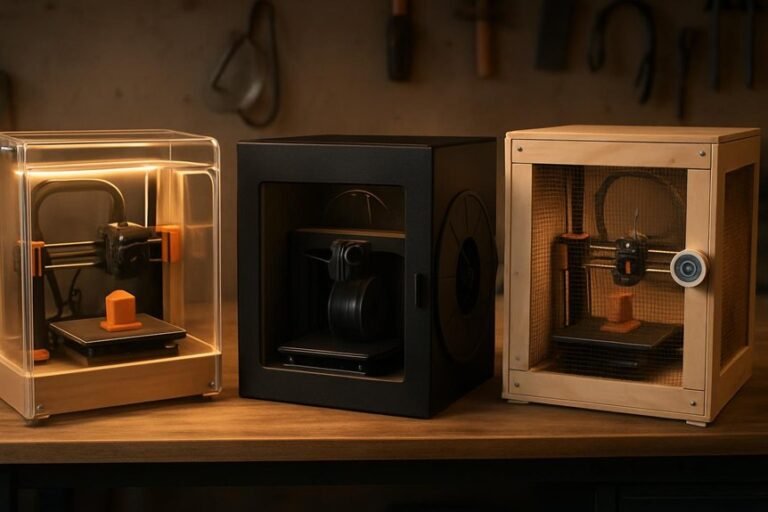
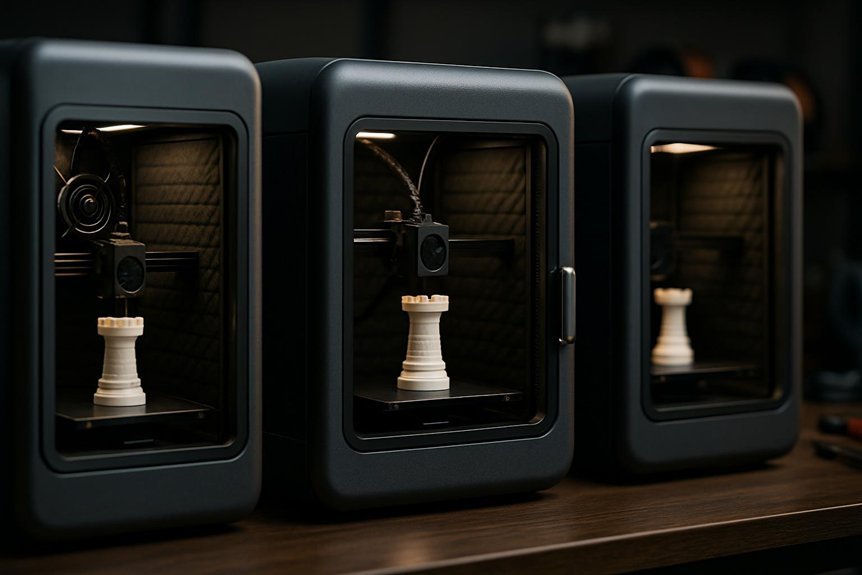
If you want a quieter, cleaner 3D printing setup, choosing the right enclosure makes a big difference. You’ll cut down noise, trap fumes, and keep temperature stable so prints come out better — and you don’t need a garage full of gear to do it. I’ll walk you through three top enclosures that fit the Bambu Lab A1 family, explain why they work, and point out what to check before you buy so you don’t regret it.
3D Printer Enclosure for Bambu Lab A1 Combo (Stainless Steel Frame, LED Light)
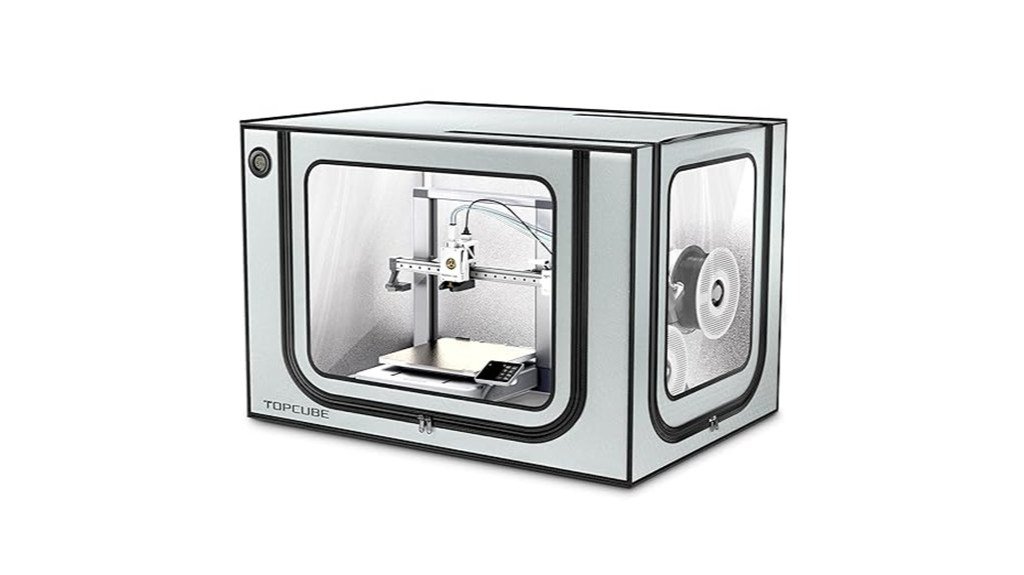
If you own a Bambu Lab A1 Combo and want quieter, more reliable prints, this stainless-steel enclosure is a smart pick because it’s made specifically to fit that model and its AMS lite setup. You’ll appreciate the snug fit and thoughtful AMS lite cable inlet, plus the four-way pneumatic interface keeps tubing tidy. It stabilizes temperature and humidity to cut warping and protect the motherboard from exceeding 40℃. Noise drops from about 60 to 40 dB, so you can work nearby. Installation takes five minutes, it’s fireproof and dustproof, and the LED-lit window makes monitoring easy and safe.
Best For: owners of the Bambu Lab A1 Combo who want quieter, more reliable prints with tidy AMS lite cable management and stable temperature control.
Pros:
- Creates a stable, warm and humidified print environment to reduce warping and protect the motherboard (internal temp stays below 40℃).
- Cuts noise significantly (around 60 dB down to ~40 dB) and provides dustproof, fireproof protection for safer operation.
- Quick 5-minute stainless-steel frame installation with integrated LED light, large observation window, and AMS lite cable/pneumatic inlet routing.
Cons:
- Designed specifically for the Bambu Lab A1 Combo — not a universal enclosure for other printers or sizes.
- Adds enclosure footprint and may limit access for some modifications or upgrades during prints.
- While it reduces odors/particles, it does not replace dedicated ventilation or filtration systems for heavy ABS/ventilation needs.
3D Printer Enclosure Cabinet with Ventilation, Thermo-Hygrometer, LED Light (Fits up to 23 x 22.4 x 25.4 in)
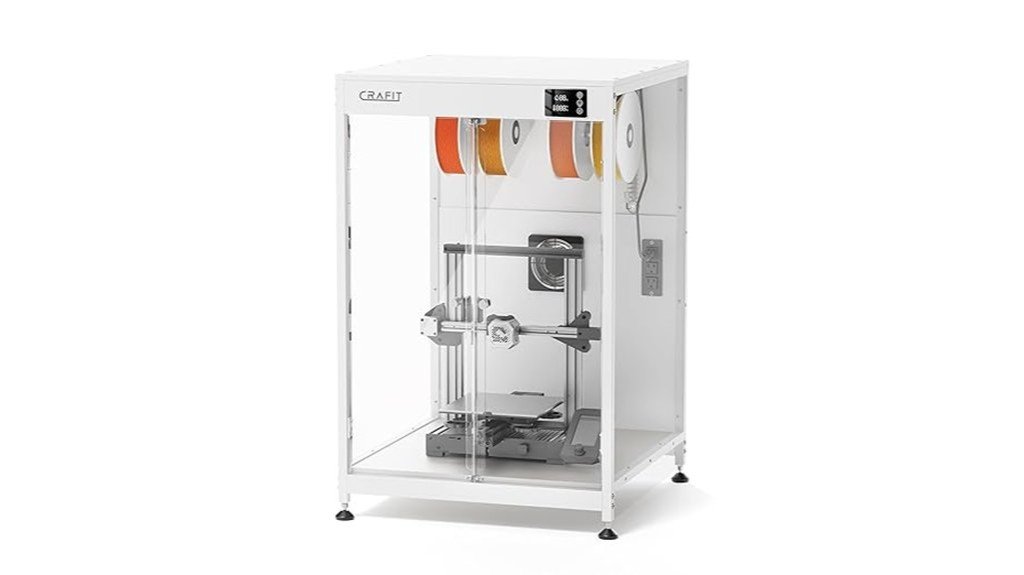
This enclosure is a great pick for hobbyists and small-shop makers who want quieter, cleaner prints without sacrificing visibility or control — think of it as a climate-controlled home for your printer. You get a sturdy carbon-steel frame, thick PET panels, and panoramic windows so you can watch prints clearly while LED lighting keeps details visible. A thermo-hygrometer helps you monitor conditions, and a manual exhaust fan clears fumes after printing without upsetting temperature stability. Assembly is pretty simple, though expect occasional packaging or minor fit issues. If you value control and noise reduction, it’s a solid option.
Best For: hobbyists and small-shop makers who want a quieter, climate-controlled printing environment with good visibility and basic fume control.
Pros:
- Sturdy carbon-steel frame with thick PET panels and panoramic windows for clear visibility and reduced noise.
- Built-in thermo-hygrometer and LED lighting help maintain and monitor optimal printing conditions and visibility.
- Manual exhaust fan allows post-print fume/pollutant clearing without disturbing temperature stability.
Cons:
- Some users report packaging damage and minor quality-control issues (bent parts, sticky protective film).
- Use of pressboard back panel and thinner acrylic in places leads some to question overall material value.
- May be considered overpriced by those expecting higher-end materials for the price.
3D Printer Enclosure for Bambu Lab A1 (360° Transparent Acrylic with LED Light)
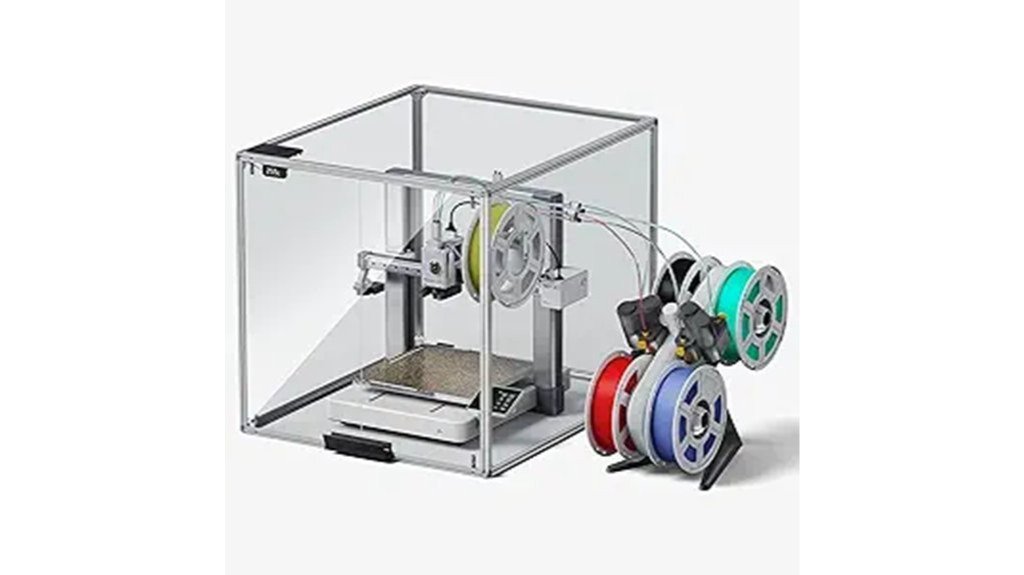
Hobbyists and small workshops who want clear, quiet, and reliable printing will like the 3D Printer Enclosure for Bambu Lab A1, thanks to its full 360° transparent acrylic panels and built-in LED light that let you watch prints closely without opening the case. You’ll get consistent temperature control (never above 40℃), a centralized panel for LED, fan, and temp readout, plus solid noise reduction—up to 60% quieter—and filtration for particles and odors. It stabilizes prints and keeps kids and pets safe, though assembly and occasional electronics or vibration complaints mean you should inspect parts and follow instructions carefully.
Best For: Hobbyists and small workshops who want clear visibility, quieter operation, and more consistent prints with the Bambu Lab A1.
Pros:
- 360° transparent acrylic and built-in LED allow continuous, real-time monitoring without opening the enclosure.
- Maintains consistent internal temperature (≤40℃) and reduces drafts/odds of warping, improving print quality.
- Centralized controls, filtration, and sturdy build improve safety, reduce odors/particles, and cut noise up to ~60%.
Cons:
- Assembly instructions and initial dimensions have caused confusion and compatibility issues for some users.
- Some reports of vibration-related noise and occasional electronics failures.
- Perceived flimsy parts by some buyers, requiring careful inspection during setup.
Factors to Consider When Choosing Silent 3D Printer Enclosures
When you’re choosing a silent 3D printer enclosure, pay attention to the materials used for noise reduction and how well the panels fit together, because both affect how quiet and sturdy it will be. You’ll also want good sealing, proper ventilation with filtration, and temperature control so prints stay consistent and fumes are managed safely. Finally, make sure the enclosure actually fits your printer and accessories, since a snug, compatible build saves you headaches and keeps performance reliable.
Noise Reduction Materials
Although it might seem like a small detail, the materials you pick for a 3D printer enclosure make a big difference in how quiet your workspace will be, and choosing wisely can drop noise from around 60 dB to 40 dB or less. Pick medium density fiberboard or thick PET panels to absorb sound and cut down vibrations; they’re sturdy, affordable, and work well together. You’ll also want fireproof and dustproof layers, since denser structures naturally damp sound while keeping you safe. Multi-layer walls or thicker panels give better insulation, isolating motor and fan noise. Finally, add a few acoustic panels or sound‑dampening foam inside to tame echoes — they make prints noticeably calmer without breaking the bank.
Enclosure Sealing Quality
Good seals do more than keep noise in — they keep your print environment steady, safe, and predictable. You’ll notice a well-sealed enclosure can drop noise from about 60 dB to near 40 dB, which makes a huge difference if your printer shares living space. Good seals also cut drafts, so temperature and humidity stay steady and prints warp less. Sealing materials that hold up over time matter, because worn gaskets let sound and environmental changes leak through. They’ll also keep dust, particles, and odors contained, which is important with certain filaments and in homes with kids or pets. When shopping, check seal durability and how tightly doors and panels close — it’s a small feature with big benefits.
Ventilation and Filtration
Because air quality and temperature affect print strength and safety, you’ll want an enclosure that handles both fumes and heat without fuss. Look for effective ventilation like a manual exhaust fan so fumes and particles get pulled out after printing, yet the chamber stays stable while you print. Integrated thermo-hygrometers give you real-time readings of temperature and humidity, helping you catch filament issues before they ruin a job. Choose enclosures that minimize drafts to keep conditions steady—less warping, fewer failed prints. Materials and filters that trap harmful particles and odors matter, especially with ABS or TPU, and a fully enclosed design can cut noise substantially, sometimes from about 60 dB down to 40 dB, making your workspace calmer.
Temperature Stability Control
When you want reliably smooth prints, temperature stability inside the enclosure matters more than you might think, and it’s something you can actually control. You’ll want an enclosure that keeps internal temps steady, ideally below 40℃, because spikes cause warping and ruined prints. A fully enclosed design cuts drafts and reduces temperature swings, and that also helps humidity stay predictable so your filament behaves. Look for models with vents or manual exhaust fans so you can remove fumes without dumping heat or letting cold air in. Built-in thermo-hygrometers give you real-time readouts, letting you tweak ventilation or add small heaters or desiccants when needed. With these features, you’ll get fewer failures and more consistent results.
Build Fit and Compatibility
Start by measuring your printer and comparing those numbers to the enclosure’s internal dimensions, because even a few centimeters can make or break the fit. You’ll want an enclosure that matches or exceeds your printer’s footprint and height so the bed and gantry move freely. Check model compatibility—some enclosures target specific brands, and that can affect ventilation, cable routing, and overall performance. Look for built-in cable inlets and vents arranged for your machine; they keep functionality intact without awkward mods. Pay attention to materials: rigid panels and vibration-damping construction help preserve print precision and reduce noise. Finally, choose a design that assembles cleanly at your workspace, since an enclosure that’s easy to install will integrate smoothly with your setup and save frustration.
Ease of Access/Maintenance
A good enclosure doesn’t just sit around your printer—it makes working on and caring for the machine quicker and less frustrating. You’ll want one that’s simple to assemble and disassemble so you can reach the printer for upgrades or fixes in minutes, not hours. Large observation windows let you watch prints without opening the box and disturbing temperature or fans. Look for centralized control panels that put lighting, fan speed, and temperature adjustments within easy reach so you can tweak settings mid-print. Removable trays or internal parts make cleaning straightforward, and you’ll thank yourself when dusting is quick. Finally, read user reviews about assembly and access — real experiences often reveal sticky latches or clever design choices you’d otherwise miss.
FAQ
Can Enclosures Reduce ABS Warping Effectively?
FAQ on Enclosures and ABS Warping
1. How do enclosures help with ABS warping?
Enclosures help by maintaining a stable, elevated temperature around the print, which minimizes temperature fluctuations that can cause warping.
2. What temperature do enclosures maintain for effective ABS printing?
Enclosures typically maintain temperatures above 50°C, which helps to keep the ABS material pliable and enhances adhesion between layers.
3. Can enclosures prevent drafts during printing?
Yes, enclosures effectively block drafts that could lead to uneven cooling of the print, further reducing the risk of warping.
4. Will using an enclosure improve layer adhesion?
Absolutely. By maintaining a consistent temperature, enclosures promote better layer adhesion, which is crucial for the structural integrity of the print.
5. Is proper ventilation necessary when using an enclosure?
Yes, while enclosures help control temperature, proper ventilation is essential to manage fumes and prevent overheating within the enclosed space.
6. Do all types of enclosures work for ABS printing?
Most enclosures designed for 3D printing will aid in reducing ABS warping, but effectiveness may vary based on the enclosure’s insulation and design.
7. Can I print without an enclosure if I’m using ABS?
While you can print without an enclosure, it significantly increases the chances of warping and may lead to less reliable prints.
8. How does an enclosure affect print time?
Using an enclosure may slightly increase print times due to the need for the printer to maintain a consistent temperature, but the trade-off is often improved print quality.
9. Will an enclosure eliminate all warping issues with ABS?
While enclosures greatly reduce warping, they may not completely eliminate it, especially if other factors like print settings or material quality are not optimal.
10. Can I use an enclosure for materials other than ABS?
Yes, enclosures can be beneficial for other materials that are sensitive to temperature changes, such as ASA or certain nylon filaments.
Are Enclosures Safe for Continuous Overnight Printing?
1. Are enclosures safe for overnight 3D printing?
Yes, enclosures can be safe for overnight 3D printing when properly managed.
2. What should I monitor for safe overnight printing in enclosures?
You should monitor ventilation, temperature limits, and ensure effective fire suppression measures are in place.
3. How can I enhance safety with smoke detection?
Installing smoke detectors inside or near the enclosure adds an extra layer of safety by alerting you to potential fires.
4. What type of electrical setup should I use for overnight printing?
Use reliable power sources and quality wiring to minimize the risk of electrical issues during printing.
5. Should I keep flammable materials in the enclosure?
No, never leave flammable materials inside the enclosure to reduce fire hazards.
6. How often should I inspect my printing setup?
Routine inspections of your enclosure and equipment are crucial to ensure ongoing safety and functionality.
7. What firmware safeguards should I implement?
Ensure that your printer’s firmware is updated and configured to halt printing in case of anomalies.
8. Can I leave my printer unattended overnight?
While enclosures can enhance safety, it’s best to check on the printer periodically rather than leaving it completely unattended for long periods.
9. What temperature limits should I maintain?
Keep the temperatures within the manufacturer’s recommended limits to prevent overheating or material degradation.
10. How important is ventilation in an enclosure?
Ventilation is critical to prevent the buildup of harmful fumes and to maintain appropriate temperatures inside the enclosure.
Do Enclosures Affect Printer Calibration or Bed Leveling?
FAQ 1: How do enclosures impact printer calibration?
Enclosures can alter the ambient temperature around the printer, which may affect calibration settings. Changes in temperature can lead to variations in the material being printed, necessitating recalibration.
FAQ 2: Can enclosures cause bed leveling issues?
Yes, enclosures can cause bed leveling issues due to thermal expansion and contraction of materials. This can lead to slight warping, impacting the flatness of the print bed.
FAQ 3: Should I re-level my print bed after using an enclosure?
It is advisable to re-level your print bed after using an enclosure to ensure optimal printing conditions. The changes in temperature can affect the bed’s position and leveling.
FAQ 4: What is thermal drift in 3D printing?
Thermal drift refers to the gradual change in temperature that can occur during printing, potentially affecting the accuracy of prints. Enclosures can amplify this effect due to their insulation properties.
FAQ 5: How can I monitor thermal drift in my printer?
You can monitor thermal drift by regularly checking temperature readings during printing. Additionally, using a thermal camera or temperature sensor can provide insights into fluctuations.
FAQ 6: Should I secure mounts in an enclosed printer?
Yes, securing mounts in an enclosed printer is essential to prevent any movement that can affect print quality. The stability provided by secured mounts helps maintain consistent calibration.
FAQ 7: What role does auto-bed leveling play in enclosures?
Auto-bed leveling can help compensate for any minor inconsistencies caused by temperature changes in an enclosure. It adjusts the bed height dynamically, improving print adhesion and accuracy.
FAQ 8: What is mesh compensation in 3D printing?
Mesh compensation is a technique that creates a mesh map of the print bed’s surface, allowing the printer to adjust for any unevenness. This is particularly useful in enclosed environments where bed warping may occur.
FAQ 9: Are there specific materials that are more affected by enclosures?
Yes, certain materials, such as ABS or PETG, are more sensitive to temperature fluctuations and may warp more easily in enclosures. It’s important to consider material properties when using an enclosure.
FAQ 10: How often should I check my printer’s calibration in an enclosure?
Regularly checking calibration is recommended, especially after extended use of the enclosure. A good practice is to calibrate after every few prints or whenever you notice inconsistencies in print quality.
Can I Add HEPA Filtration to These Enclosures?
FAQ 1: Can I install HEPA filtration in my enclosure?
Yes, HEPA filtration can be added to enclosures to improve air quality and particle capture.
FAQ 2: What components do I need for HEPA filtration?
You’ll need a fan, a correctly sized HEPA filter, and sealed ducting or baffles for effective installation.
FAQ 3: How often should I replace the HEPA filter?
Periodic filter replacement is necessary to maintain optimal airflow and ensure effective capture of ultrafine particles.
FAQ 4: Will adding HEPA filtration affect airflow?
Yes, adding HEPA filtration can impact airflow; it’s essential to size the fan and filter correctly to maintain proper circulation.
FAQ 5: Can I use any fan with a HEPA filter?
Not all fans are suitable; ensure the fan is compatible with the size and requirements of the HEPA filter you choose.
FAQ 6: What are the benefits of HEPA filtration in enclosures?
HEPA filtration helps capture ultrafine particles, improving air quality and reducing allergens within the enclosure.
FAQ 7: Is it difficult to install HEPA filtration in an enclosure?
The installation process can vary based on the enclosure design, but with the right components and planning, it can be straightforward.
FAQ 8: Do I need sealed ducting for HEPA filtration?
Yes, sealed ducting or baffles are important to ensure that air passes through the HEPA filter and minimizes leaks.
FAQ 9: Can I add HEPA filtration to any type of enclosure?
HEPA filtration can be added to various types of enclosures, but considerations about airflow and space should be taken into account.
FAQ 10: What maintenance is required for a HEPA filtration system?
Regular maintenance includes checking and replacing the HEPA filter as needed, along with ensuring the fan and ducting remain clean and functional.
Will Enclosures Void My Printer Warranty?
1. Can enclosing my printer void the warranty?
Yes, enclosing your printer can void the warranty if it alters ventilation or electrical components, or leads to damage.
2. What should I check before adding an enclosure?
Review your printer’s warranty terms to understand any restrictions regarding modifications and enclosures.
3. Are all manufacturers the same regarding warranties?
No, warranty policies vary by manufacturer. Each company has different rules about modifications and enclosures.
4. What types of modifications are most likely to void the warranty?
Modifications that affect ventilation, electrical components, or structural integrity are most likely to void your warranty.
5. Is it safe to assume any enclosure will be fine?
No, not all enclosures are safe. Ensure that the enclosure allows for proper ventilation and does not obstruct any critical components.
6. What should I do if I’m unsure about my warranty coverage?
Contact your printer’s manufacturer directly to clarify any concerns about warranty coverage related to enclosures.
7. Will a third-party enclosure affect my warranty?
It can, depending on the design and how it interacts with the printer’s function. Always verify with the manufacturer.
8. Can I modify my printer without voiding the warranty?
Some modifications may be permissible, but it’s essential to consult the warranty terms and manufacturer guidelines first.
9. How can I prevent warranty issues when enclosing my printer?
Choose an enclosure designed specifically for your printer model and ensure it maintains proper airflow and accessibility.
10. What if my enclosure leads to damage?
If the enclosure causes damage to the printer, the warranty will likely be voided, and you may be responsible for repair costs.
Final Thoughts
You’ve got three top-tier options to ensure your 3D prints are both quiet and clean. First, consider the stainless-steel A1 Combo enclosure. It’s built for durability and excels at noise reduction—perfect for minimizing distractions in your workspace. Next, the ventilated cabinet offers the best of both worlds: excellent airflow control and clear visibility of your prints in progress. Finally, there’s the acrylic A1 enclosure, which provides full 360° viewing while maintaining stable temperatures for optimal printing conditions.
When making your choice, prioritize noise levels, ventilation, size, and visibility. Select the enclosure that best suits your space and the materials you work with. With the right setup, you’ll achieve quieter, cleaner prints with less hassle and increased confidence in your results. Trust me, investing in the right enclosure will elevate your 3D printing experience significantly.